Simplified Kafka concept and example with nodejs

I am a full stack developer who is willing to share what I have learned from various sources.
Introduction
Kafka is a distributed-event store and stream-processing platform supported by Apache.
How it works
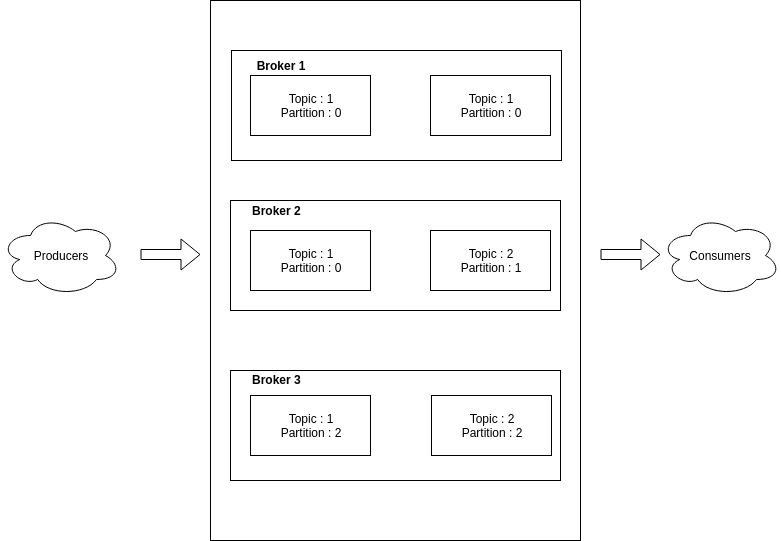
Kafka improves the traditional server-client mechanism by putting a layer between server and client which acts as a connector storing the events, produced from the servers(producers) through the specified topic, and serving the event stream to the client(consumer).
Prerequisites
- Need to have docker application on your machine
- Need to have an intermediate knowledge of how nodejs application works
Let's start coding
In this article, we are gonna use ready-made docker compose file, which setup for kafka service, To create a kafka-node application, follow the steps described below.
- Open docker application
- Create a new file named docker-compose.yml in your project directory and copy the following codes into the file
version: "3" services: zookeeper: image: 'bitnami/zookeeper:latest' ports: - '2181:2181' environment: - ALLOW_ANONYMOUS_LOGIN=yes kafka: image: 'bitnami/kafka:latest' container_name: 'kafka' ports: - '9092:9092' environment: - KAFKA_BROKER_ID=1 - KAFKA_LISTENERS=PLAINTEXT://:9092 - KAFKA_ADVERTISED_LISTENERS=PLAINTEXT://127.0.0.1:9092 - KAFKA_ZOOKEEPER_CONNECT=zookeeper:2181 - ALLOW_PLAINTEXT_LISTENER=yes depends_on: - zookeeper - Run the following command in the directory same as the docker file to start the kafka
docker-compose up - Run the following commands to initialize the node project
npm init - Run this to install the node package which will let you connect to kafka server in your node application
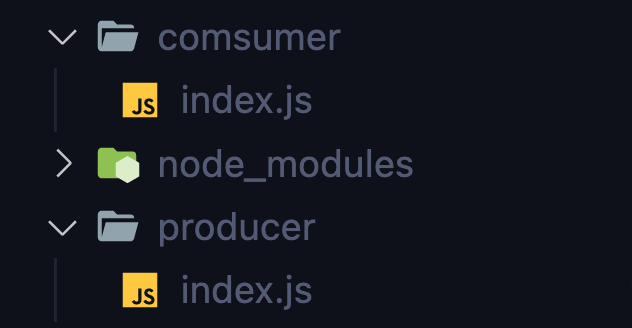
npm install node-rdkafka For producer and consumer, create index.js files in their respective folder
- You can emit events from producer by the following code,
 import Kafka from 'node-rdkafka';
 console.log('Producer ...');
 const stream = Kafka.Producer.createWriteStream({
     "metadata.broker.list": "localhost:9092"
     },
     {},
     { topic: 'test' }
 )
 function queueMessage()
 {
     const message = 'Hello world'
     const success = stream.write(Buffer.from(message))
     if (success)
     {
         console.log('success');
     }
     else
     {
         console.log('something went wrong!')
     }
 }
 setInterval(() => {
     queueMessage()
 }, 3000)
You can subscribe the specified topic and get the sequence of events streamed from the producers as follow,
console.log('Comsumer ...') import Kafka from 'node-rdkafka'; const consumer = Kafka.KafkaConsumer({ "group.id": "kafka", "metadata.broker.list": "localhost:9092" }, {} ); consumer.connect(); consumer.on('ready', () => { console.log('consumer ready . . . ') consumer.subscribe(['test']); consumer.consume(); }).on('data', (data) => { const buf = Buffer.from(data.value); console.log('Message received: ', buf.toString()); });- We need to create commands in the package.json file to run the producer and consumer.
"scripts": { "start:producer": "node producer/index.js", "start:consumer": "node consumer/index.js" }, - Finally, we can run both producer and consumer by enter the following lines into the console.
npm run start:producernpm run start:consumer
You can see the message emitted by producer inside the consumer console.
Conclusion
Producer can emit events to the kafka server through the topic. Theses events are persistant inside the server and queued like a log file. When consumer make a request with the certain topic, kafka server response all the queued event reside in it back to consumer.
Reminder
Please note that this is the simplified version of how kafka works. Hope you will have the overview of Kafka.